microsoft Memes

With All Due Respect To Vibe Coders, I Can't For The Life Of Me Figure Out The Use Case For A Computer That Hallucinates And Can't Do Basic Math In Software Engineering

With All Due Respect To Vibe Coders, I Can't For The Life Of Me Figure Out The Use Case For A Computer That Hallucinates And Can't Do Basic Math In Software Engineering
The absolute savagery of comparing Windows' multi-monitor detection to AI hallucinations is *chef's kiss*. Windows has been confidently detecting phantom monitors since the dawn of time, arranging them in configurations that defy the laws of physics and geometry. Look at that beautiful disaster: monitors 1-4 arranged like some kind of abstract art piece, with monitor 1 highlighted in pink like it's the chosen one. Spoiler alert: monitor 1 probably doesn't exist. Windows is just vibing, making up displays like a neural network on a creative writing binge. The title's roast of AI is perfect here because Windows literally invented the concept of confidently being wrong about hardware. Your cursor disappears into the void? That's because it's chilling on monitor 7 that you unplugged in 2019. Want to drag a window? Good luck finding which imaginary screen it yeeted itself to. At least when AI hallucinates, we can blame cutting-edge technology. Windows has been doing this for decades with zero excuse. It's the OG hallucinator, and it doesn't even need a GPU to do it.

Evolution Of The Trash Icon

Evolution Of The Trash Icon
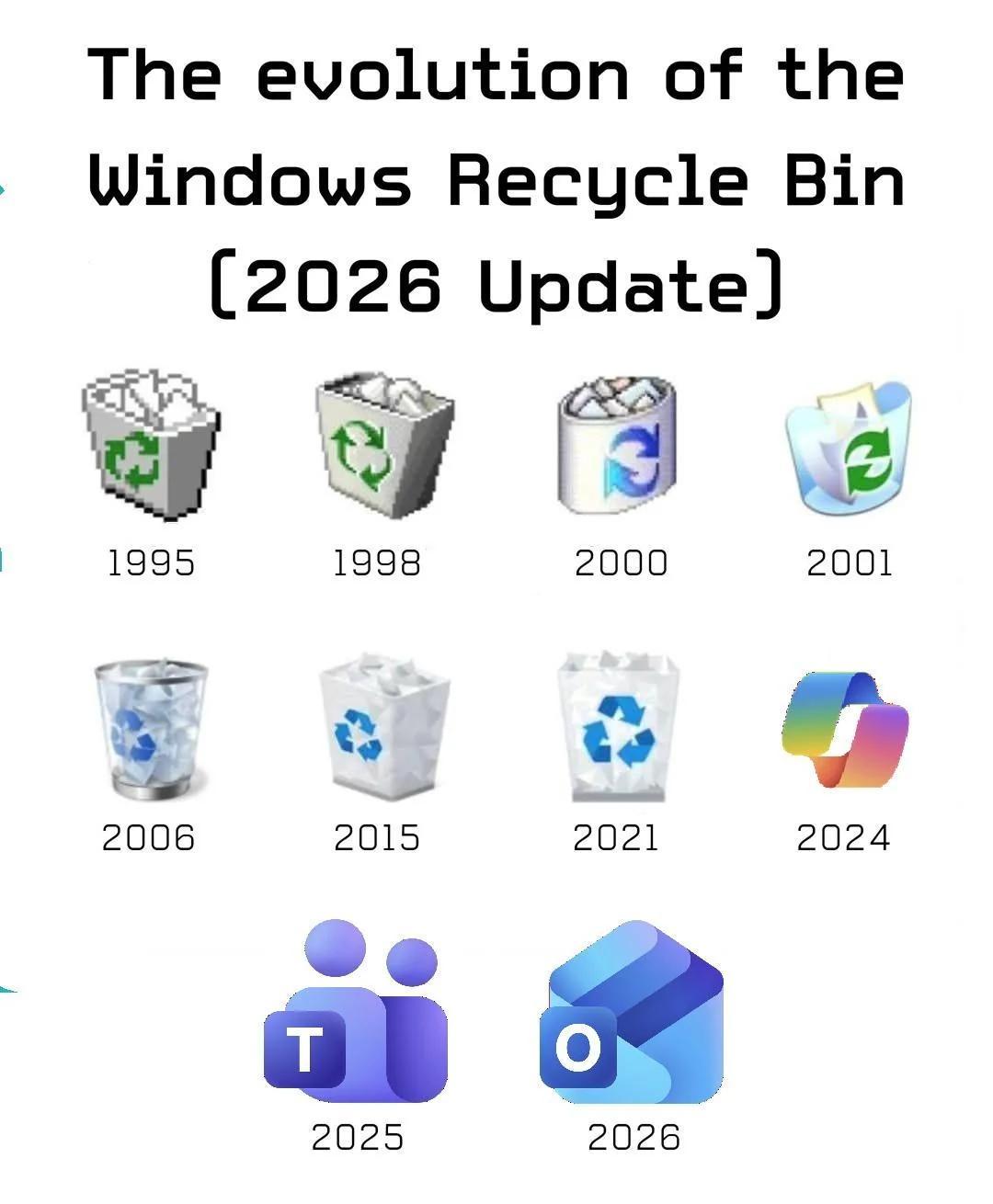
Started with actual trash cans, gradually refined the design with better graphics and transparency effects, and then by 2023 someone in the design department apparently forgot what a trash can looks like and submitted a gradient blob that could literally be an app for meditation, fitness tracking, or launching nuclear missiles. The real tragedy here is watching Microsoft's icon design team go from "let's make a recognizable trash can" to "what if we made it impossible to identify any icon without hovering over it for the tooltip?" Peak modern UI design: when you need a legend to navigate your own desktop. Fun fact: The 2023 icon has more colors than a pride parade but somehow conveys less information than the 16-color 1995 version. Progress.

There's A Web And Bing Version Too

There's A Web And Bing Version Too
Microsoft really looked at GitHub Copilot and said "you know what this needs? More versions." Like one AI code assistant wasn't enough to haunt your dreams with questionable suggestions, now we've got Copilot 365 for your spreadsheets, Copilot for Web to mess up your browsing, and probably a Bing version that nobody asked for but exists anyway. The meme uses the classic "but what about second breakfast" format from Lord of the Rings, except instead of hobbits wanting more food, it's Microsoft executives wanting more Copilot variants. Because apparently, the solution to everything is slapping "Copilot" on it and calling it innovation. Next up: Copilot for your toaster, Copilot for your car, Copilot for your Copilot. At this rate, we'll need a Copilot just to keep track of all the different Copilots.

A Second Great Reason Not To Leave Your Laptop Unattended

A Second Great Reason Not To Leave Your Laptop Unattended
The classic office prank gets an enterprise twist. Someone at the MVP Global Summit decided to weaponize Microsoft's aggressive Windows 11 upgrade campaign as a threat against unlocked laptops. The beauty here is the dual-layer trolling: not only is your machine getting pranked, but the "upgrade" itself is the punishment. Because nothing says "I got you good" quite like forcing someone to deal with a centered taskbar and mandatory TPM 2.0 requirements. The first great reason to lock your laptop? Someone posts "I'm gay" on your Slack. The second? Forced migration to an OS that'll spend the next hour asking if you want to use Edge and Bing. Both equally devastating to your afternoon productivity. Pro tip: Win+L is your friend. Unless you work at Microsoft, where they apparently just do the upgrade anyway.

Die In Honour

Die In Honour
Linux purists would literally choose death over touching Windows. The burning house represents a catastrophic system failure, and the only escape route is through "windows" - but here's the kicker: they'd rather perish in the flames than compromise their principles by using anything Microsoft-related. It's the ultimate display of operating system loyalty. No dual-booting, no emergency Windows partition, no VM as a backup plan. Just pure, unadulterated commitment to the penguin. Some might call it stubborn. Linux users call it integrity. The best part? They'll probably spend their final moments trying to fix the burning house with a bash script instead of just climbing out the window like a normal person.

Yeeeeeep

Yeeeeeep
Steam's account recovery system is like that friend who helps you move but accidentally drops your TV down the stairs. Sure, you got your account back, but now you've lost every game, friend, achievement, and screenshot from the last decade. Meanwhile Microsoft's over here like "we deleted everything just to be safe" as if nuking your entire digital library is somehow more secure than just changing the password. Both companies treating your account like it's contaminated evidence that needs to be incinerated. Nothing says "customer service" quite like making the victim suffer more than the hacker.

Progress

Progress
From landing on the moon with 4KB of RAM to landing on the moon with two instances of Outlook that won't even open. Humanity went from calculating orbital trajectories on computers less powerful than a toaster to being unable to manage email on machines that could run the entire Apollo program a thousand times over. The irony is beautiful: we've got exponentially more computing power, yet somehow we're struggling with basic productivity software. Armstrong made history with less computational power than your smart fridge, while modern astronauts are probably rebooting Outlook in orbit. Nothing screams "technological advancement" quite like needing two broken instances of the same email client. Fun fact: The Apollo Guidance Computer had 64KB of memory and got humans to the moon. Meanwhile, Outlook uses about 200MB just to tell you "Not Responding." Progress, indeed.

Especially If I Set Up Windows

Especially If I Set Up Windows
Every software company asking for telemetry data "to improve user experience" gets the same answer: a hard no. And if it's Windows? Double no. Triple no. The kind of no that comes from someone who's seen what happens when you click "yes" to all those helpful data collection prompts during setup. Windows is basically a telemetry vacuum cleaner with an operating system attached. During installation, you get about 47 different screens asking permission to collect your data, track your usage, send diagnostic information, improve Cortana, enhance your experience, and probably monitor your dreams. The answer to all of them? No. Disable everything. Uncheck all boxes. Burn the telemetry to the ground. Because we all know "additional data to improve" really means "we want to know everything you do so we can monetize it later." Hard pass.

Memorialized For All Time

Memorialized For All Time
Nothing says "humanity's greatest achievements" quite like comparing landing on the moon to... complaining about Microsoft Outlook from the actual moon. Apollo 11: Neil Armstrong delivers one of history's most iconic quotes while taking humanity's first steps on another celestial body. Artemis II: Reid Wiseman immortalizes the universal developer experience of Microsoft products refusing to cooperate at the worst possible moment. Both equally important contributions to human civilization, obviously. The fact that even 50+ years later, astronauts are still dealing with the same Microsoft nonsense we all suffer through daily is somehow both depressing and oddly comforting. At least we know that even in space, nobody can hear you scream at Outlook for syncing issues. Future generations will look back at these quotes with equal reverence. One small bug for man, one giant headache for IT support.

We Are All Copilot This Blessed Day

We Are All Copilot This Blessed Day
Microsoft really looked at their product naming strategy and said "what if we just called everything the same thing?" Now we've got 80 different Copilots talking to each other like some kind of corporate identity crisis. There's a Copilot inside your Copilot, a Copilot for your Copilot, and apparently a physical keyboard key to summon them all like you're casting a spell in a very boring RPG. The diagram looks like a spider's fever dream, with lines connecting everything to everything else. It's the tech equivalent of naming all your kids "Steve" and then wondering why family dinners are confusing. Someone in Redmond's marketing department definitely got promoted for this galaxy brain move. Fun fact: There are now more products named Copilot than there are developers who can remember what each one actually does. Good luck explaining to your PM which Copilot you need budget approval for.

Windows Troubleshoot Code Be Like

Windows Troubleshoot Code Be Like
Windows troubleshooter in a nutshell: pretend to work for a bit, then gaslight you into thinking nothing was wrong in the first place. The sleep(60000) is chef's kiss—that's a full minute of doing absolutely nothing while showing you that fancy "Detecting problems..." animation. Meanwhile, your WiFi is still broken, your printer still thinks it's offline, and you're questioning your life choices. But hey, at least it tried, right? The best part is this code is probably more functional than the actual troubleshooter.

Let's Finish Configuring Your PC

Let's Finish Configuring Your PC
Windows setup really thinks it's doing you a favor by aggressively pushing OneDrive down your throat like it's some kind of essential system component. You just want your files on your local SSD where you can actually control them, but Microsoft's got other plans for your data. Nothing says "user choice" quite like having to fight off cloud storage integration during every fresh Windows install. The knife really captures the energy here—OneDrive isn't taking no for an answer. It'll sync your Desktop folder whether you like it or not, then wonder why you're confused when your files disappear because you're offline. Pro tip: That "Skip" button they hide in the corner? You'll need a magnifying glass and the determination of someone debugging a race condition at 3 AM to find it.