Frontend Memes

Frontend development: where you spend three hours trying to center a div and then your boss asks why you haven't finished the entire website. These memes capture the special joy of browser compatibility issues – 'looks great in Chrome' is both a celebration and an admission of defeat. We've all been there: the design that looks perfect until the client opens it on their ancient iPad, the CSS that works by accident, and the framework churn that makes your resume look like you're collecting JavaScript libraries. If you've ever had nightmares about Safari bugs or explained to a client why their 15MB image is slowing down the site, these memes will be your digital therapy session.
Swiss Army Knife Of HTML

Swiss Army Knife Of HTML
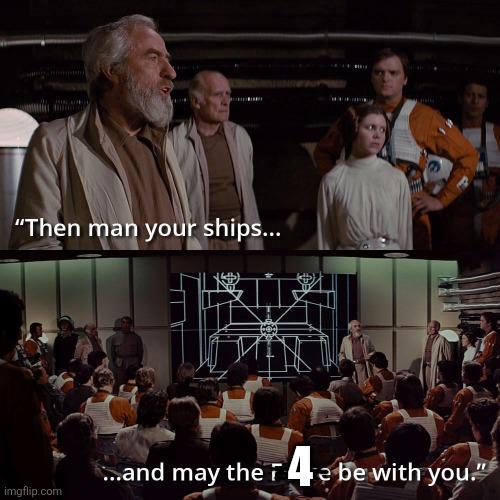
Right-click, "View Source," and boom—an endless army of <div> tags staring back at you like Agent Smith clones. Semantic HTML? Never heard of her. Why use <section> , <article> , <nav> , or <header> when you can just slap a <div> on everything and call it a day? It's the duct tape of web development—works for everything, means nothing, and your screen reader is crying in the corner. Accessibility engineers everywhere just felt a disturbance in the force.

Forgot The Base Case

Forgot The Base Case
Picture this: You've tested your datepicker with negative numbers, special characters, null values, edge cases from the ninth circle of hell itself. You're basically a QA god at this point. But then someone asks what you actually put IN the datepicker and—plot twist—it was A DATE. You know, the ONE thing a datepicker is literally designed to handle? The base case? The most OBVIOUS input imaginable? That's right, folks. Our hero tested everything EXCEPT the actual happy path. It's like stress-testing a bridge with tanks and earthquakes but forgetting to check if a regular car can drive across it. The awkward silence says it all. Sometimes the most catastrophic bugs hide in plain sight, wearing a sign that says "I'm literally the primary use case." Chef's kiss of irony right there.

Developers Vs Users

Developers Vs Users
You spend three months architecting the perfect mobile experience with smooth animations, intuitive gestures, and delightful micro-interactions. The team celebrates. The stakeholders are thrilled. Then you watch actual users through analytics and they're just... spinning the entire app upside down, tapping everything with their forehead, somehow managing to trigger edge cases you didn't even know existed. The eternal struggle: developers gently cradling their creation like a newborn, while users are out there treating it like a stress ball at a particularly intense sprint retrospective. And somehow they'll still find a way to blame YOU when things break. Classic.

When The Bug Is Human

When The Bug Is Human
Oh, the AUDACITY! The absolute NERVE of someone suggesting that YOUR code isn't fast enough! Like, excuse me, but did you just imply that my beautifully crafted, artisanal, hand-typed algorithms are somehow... *slow*? The sheer disrespect! That cat's face perfectly captures the internal screaming when someone dares to blame your "performance issues" when clearly the REAL problem is their unrealistic expectations, their potato server, their ancient browser, or literally anything else. The rejection isn't about YOUR performance, sweetie—it's about their inability to appreciate computational elegance. Maybe try running it on something that isn't powered by a hamster wheel? Just saying.

Super SWE

Super SWE
So you're telling me this "Super SWE" role wants someone who's done something remarkable, ships features before breakfast, has "undeniable proof-of-talent," believes in manifesting physical engineering futures, AND has built exceptional UIs... but LinkedIn can't even generate a job match summary because there's not enough information? Classic. The job requirements read like a tech bro's fever dream written at 3 AM after watching too many startup documentaries. "Go from 0 → 1 on an idea before breakfast" – buddy, I can barely go from 0 → 1 cup of coffee before breakfast. And "manifesting the future of physical engineering"? What is this, a software job or a TED talk audition? Over 100 people clicked apply though. Either everyone's delusional about their qualifications or we're all just that desperate for remote work. Probably both.

iOS App For Honey Extension

iOS App For Honey Extension
Someone reverse-engineered the Honey browser extension (you know, the "coupon finder" that supposedly saves you money) and found some... interesting code. The highlighted sections show tracking events being sent with coupon data, and then there's a function literally called maybeShowUserShare() . Not "definitely protect user privacy" or "ask for consent" - just maybe show the user you're sharing their data. The function name is doing some heavy lifting here. It's like naming a function maybeStealYourWallet() and acting surprised when people get upset. The code is sending analytics events with coupon codes and tracking whether coupons were applied - all that juicy e-commerce data that's worth its weight in affiliate commission gold. Nothing says "trustworthy" quite like discovering the free money-saving tool you installed is potentially monetizing your shopping habits without being super transparent about it. But hey, at least the developer was honest enough to use "maybe" in the function name. That's more transparency than most privacy policies give you.

Can People Even Tell The Difference Anymore

Can People Even Tell The Difference Anymore
You spend days crafting a pull request, refactoring everything, writing tests, adding documentation, making it absolutely beautiful. Then some bot rolls up and says "Full of AI slop, completely unhelpful" and you just... lose it. The real gut punch? Half the time the bot is right. With AI code generators flooding repos with generic solutions and copy-paste answers, human-written code is starting to look suspiciously similar to GPT's homework. We've reached the point where genuine effort gets flagged as synthetic garbage while actual AI slop sneaks through because it happened to use the right buzzwords. The Turing test has officially reversed: now we have to prove we're NOT robots.

Real

Real
Remember when 720p felt like you were looking through a window into another dimension? Now it looks like someone smeared Vaseline on your screen. Technology has spoiled us to the point where anything below 1080p feels like watching through a potato. The bottom panel's crying emoji perfectly captures that nostalgic heartbreak when you realize your childhood "HD" experience would make your current self physically recoil. It's like going back to play your favorite PS2 game and wondering if you were legally blind as a kid. Fun fact: 720p has 921,600 pixels while 4K has 8,294,400 pixels. That's almost 9x more pixels judging your life choices.

Vibe Coded Menu

Vibe Coded Menu
When your cafe tries to be all fancy and tech-savvy with laser-etched brass QR codes but forgets the most basic rule of web development: actually having a server running. Those beautiful artisanal QR codes are pointing to localhost – which, for the non-technical folks reading this, means "my own computer" and definitely not "the cafe's menu website." Someone literally deployed their local development environment to production. Or more accurately, they didn't deploy anything at all. They just scanned their own computer while testing and permanently etched that URL into brass. That's commitment to the wrong thing. The cafe spent more money on metalwork than on a $5/month hosting plan. Chef's kiss of irony right there.

Update Your Footer To 2026

Update Your Footer To 2026
Every year without fail, someone remembers in late January that they still have "© 2024 Company Name. All rights reserved." sitting in their footer. It's the web dev equivalent of writing the wrong year on checks for the first month. You know it needs updating, you even added it to your mental todo list, but somehow it always slips through until someone inevitably points it out or you randomly notice it yourself weeks later. The real pros just hardcode the current year in a template variable and forget about it forever. The rest of us? We'll see you next January when we go through this dance again.

Microsoft Certified Html Professional

Microsoft Certified Html Professional
The classic interrogation technique applied to tech bros who pad their resumes. Someone claims they "use AI to write code" and "develop enterprise applications," but when pressed for specifics, they're really just making webpages. The punchline hits different because there's a massive gap between building scalable enterprise systems and throwing together HTML/CSS landing pages, yet both can technically be called "development." The Microsoft certification in the title adds another layer of irony—Microsoft offers legitimate professional certifications for Azure, .NET, and enterprise technologies, but "HTML Professional" isn't exactly the flex you'd expect from someone building enterprise apps. It's like saying you're a Michelin-starred chef because you can make toast.

Chat Am I Acing This CS Final Or What

Chat Am I Acing This CS Final Or What
Someone built a calculator app that displays "hello world" in the output and shows "2+2" as the calculation. You know, because every CS student's journey starts with printing "hello world" and ends with... still printing "hello world" but with extra steps and a UI framework. The calculator doesn't even pretend to calculate anything. It's just hardcoded to show the sacred greeting regardless of what math you're attempting. Pretty much sums up that final project you threw together at 3 AM the night before it's due—looks functional from a distance, actually does nothing useful, but hey, it compiles and displays text on screen. Professor gives you a B- for effort. The real flex is having parentheses buttons on a calculator that only outputs "hello world". That's some next-level commitment to the bit.