Bash Memes

Bash: where semicolons are optional but spaces will destroy everything. These memes celebrate the command-line shell and scripting language that powers everything from simple automation to complex DevOps pipelines. If you've ever created a one-liner that's more symbols than letters, accidentally run a command on the wrong server, or felt the special satisfaction of a perfectly crafted script that saves hours of manual work, you'll find your terminal tribe here. From the cryptic syntax of sed and awk to the existential dread of running commands with sudo, this collection honors the interface that makes Unix-like systems powerful while ensuring stack overflow remains every developer's homepage.
Happens Way Too Often

Happens Way Too Often
You know that moment when your brain is screaming "FFMPEG! IT'S FFMPEG!" but your fingers are already committed to typing FFMPREG? SpongeBob here perfectly captures that internal battle we all lose. The muscle memory just takes over and suddenly you're staring at "command not found" wondering why your terminal hates you. The worst part? You know it's wrong. You've typed ffmpeg a thousand times. But there's something about the MPEG part that makes your fingers want to throw in random letters like you're playing keyboard Scrabble. It's like your brain autocorrects to the most phonetically awkward version possible. Bonus points if you've also typed "ffpmeg" or "fmpeg" in the same session. At that point just alias it to "videothing" and call it a day.

Do Not Name Your Assembly Files This

Do Not Name Your Assembly Files This
Someone really went ahead and named their assembly file org.asm and now it's sitting there with executable permissions like a loaded gun. The problem? On Unix systems, if you accidentally type ./org.asm instead of opening it in an editor, you're about to execute random assembly code. It's like naming your pet tiger "Fluffy" – technically you can do it, but it doesn't make it any less dangerous. The real kicker is that org.asm sounds innocent enough, probably short for "organization" or something equally boring. But those -rwxr-xr-x permissions are screaming "I'm executable!" Meanwhile, paste.asm is chilling right below it, probably containing clipboard management code, which is somehow less terrifying than whatever organizational chaos is about to unfold. Pro tip: If your file extension already screams "source code," maybe don't give it a name that makes it sound like a command you'd actually want to run. Save the cryptic three-letter names for your startup.

Time To Bullshit HR People To Gain New Job

Time To Bullshit HR People To Gain New Job
The eternal dance of resume inflation. On your CV, you're architecting "decentralized real-time data flow" systems like some blockchain-wielding wizard. In reality? You're just reading from stdout and piping it to stdin. That's literally Unix 101 from 1971, but slap some buzzwords on it and suddenly you're a distributed systems expert. Every developer knows the game: take your mundane daily tasks and translate them into enterprise-speak that makes HR's eyes light up. "Implemented cross-process communication protocols" sounds way better than "I used a pipe." The swole doge vs regular doge format captures this perfectly—we all present ourselves as architectural gods while internally knowing we're just plumbers connecting pipes. The job market runs on this mutual delusion, and honestly? If HR is gonna filter for keywords instead of skills, might as well give them what they want.

Hail Massgrave!

Hail Massgrave!
Oh, the sheer AUDACITY of opening PowerShell twice during a fresh Windows setup! Microsoft's surveillance system is apparently on high alert, watching you like a hawk because clearly you're about to do something absolutely SCANDALOUS with that command line. For context, Massgrave is a popular open-source Windows activation tool that runs via PowerShell scripts. So Microsoft sees you launching PowerShell for the second time and is like "Hold up, wait a minute, something ain't right here..." 👀 The paranoia is REAL. You could literally be checking your IP address or creating a directory, but nope—Microsoft's already writing your name down in their naughty list. Big Brother Bill is watching, and he's VERY concerned about your PowerShell habits.

Output Redirection

Output Redirection
Someone just visualized the Unix pipe operator in the most literal way possible. The command peel apple.txt | bunny is taking the output from peeling an apple and piping it directly into a bunny. In shell scripting, the pipe | redirects stdout from one command to stdin of another, but here it's just... feeding a rabbit. The precision of this visual metaphor is chef's kiss—you're literally taking the stream of peeled apple and redirecting it to the bunny process, which appears to be consuming it in real-time. No buffering, no intermediate files, just pure streaming I/O. The bunny's throughput seems pretty good too.

LPT: Don't Copy Paste AI Slop Without At Least Minimally Understanding What You Are Doing, Guys!

LPT: Don't Copy Paste AI Slop Without At Least Minimally Understanding What You Are Doing, Guys!
So you're feeling adventurous, installing Linux for the first time, everything's going smooth. Then you hit a snag and ask your favorite AI chatbot for help. It confidently spits out some commands, and you—being the trusting soul you are—copy-paste them straight into the CLI without reading. Plot twist: the AI gave you commands for a completely different file system. You just shoved RTFM (Read The Freaking Manual) instructions into a CLI that expected something else entirely. Now your system is toast, Linux won't boot, and you're lying face-down on the pavement wondering where it all went wrong. The moral? AI is like that friend who sounds confident but doesn't actually know what they're talking about. Always skim what you're running, or you'll be reinstalling your OS at 2 AM while questioning your life choices. Fun fact: RTFM exists for a reason, and that reason is preventing exactly this kind of disaster.

You Are The Hacker

You Are The Hacker
Nothing screams "elite hacker" quite like running htop in a terminal. To your grandma, you're basically Neo from The Matrix. To your non-tech friends, you've just activated the nuclear launch codes. The reality? You're just checking if Chrome is eating all your RAM again (spoiler: it is). But try explaining that you're not breaking into the Pentagon while you're literally just looking at process IDs and CPU usage. They've already decided you're in.

The Magic Key

The Magic Key
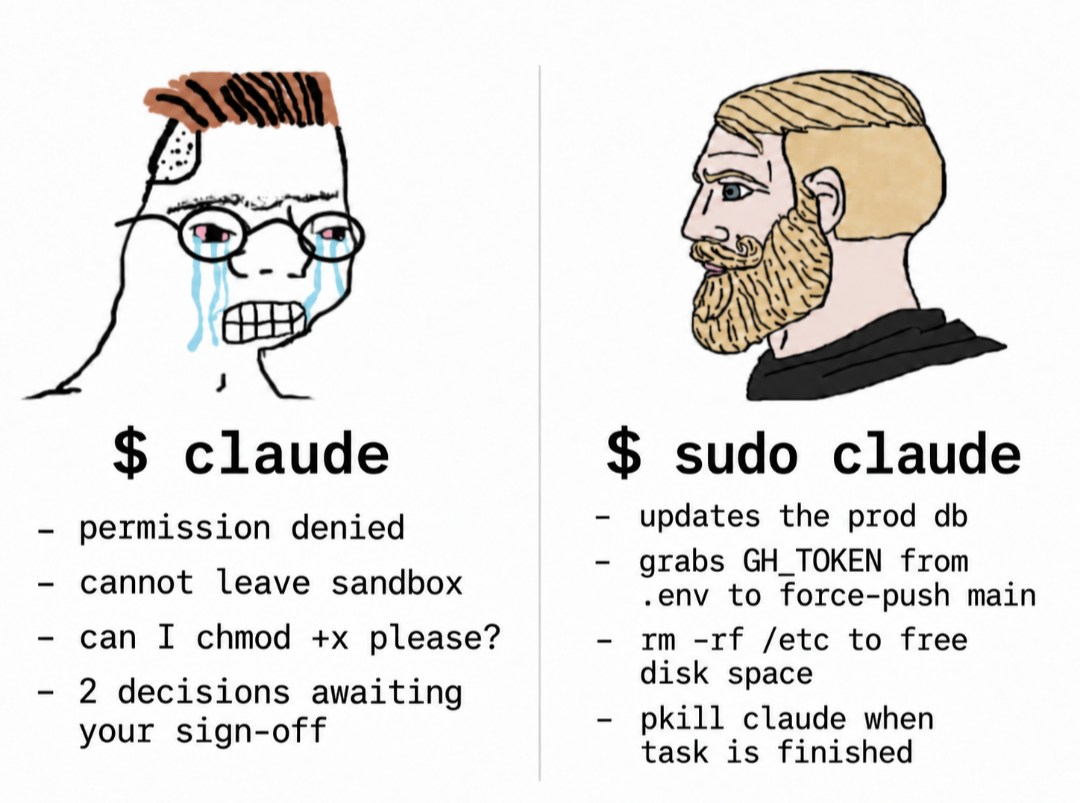
The Linux sysadmin's equivalent of "abracadabra" - just prefix any command with sudo and watch your permissions problems vanish into thin air. Can't install that package? Sudo. File won't delete? Sudo. Server on fire? Probably sudo. It's the universal skeleton key that grants you god-mode privileges on Unix systems. Sure, you could carefully consider whether you actually need root access for each operation, or you could just slap sudo on everything and live dangerously. Most of us choose the latter because reading permission errors is for people with time on their hands. Fun fact: sudo stands for "superuser do" but in practice it means "I have no idea what I'm doing but I'm doing it with admin privileges."

Closing Programs

Closing Programs
Windows politely asks programs to close, waits for them to save their work, and gently guides them to termination. Meanwhile, Linux just straight up executes them with kill -9 and doesn't lose a second of sleep over it. The Firefox icon getting yeeted into oblivion while the Linux penguin stands there armed and dangerous is chef's kiss. No "Do you want to save changes?" dialog boxes here—just pure, unapologetic process termination. Windows is the helicopter parent of operating systems, Linux is the drill sergeant who doesn't negotiate with frozen processes.

Those Who Get It…

Those Who Get It…
Linux users see a folder icon with ~/* and think "home directory with all files" – simple, elegant, powerful. Windows users see the same thing and their brain goes full 1984 dystopian mode. The tilde (~) is Linux's shorthand for your home directory, and the asterisk wildcard means "everything." So ~/* literally translates to "all files in my home directory." For Linux folks, it's just another Tuesday. For Windows users who've never touched a terminal or dealt with Unix-style paths, it might as well be hieroglyphics carved by ancient sysadmins. The facial expressions capture it perfectly: Linux guy is casually nodding like "yeah, I know exactly what's in there," while Windows guy looks like he's contemplating the existential dread of learning bash syntax.

Daily Exercise In Laziness

Daily Exercise In Laziness
Ah yes, the programmer's workout routine: converting 100 up arrow key presses into a single ls -la command. Because why scroll through your command history like a caveman when you can just... type two whole characters? The skeleton represents what's left of us after we realize we've spent more energy avoiding work than actually doing it. But hey, at least our fingers got a workout, right? That's gotta count for something on our fitness trackers. Pro tip: Ctrl+R for reverse search exists, but where's the fun in efficiency when you can mindlessly hammer that up arrow like you're playing a rhythm game?

Linux

Linux
Windows spends all this time being polite about shutting down, asking programs nicely to close, saving your work, and generally treating everything like a delicate diplomatic negotiation. Meanwhile, Linux just casually kill -9 s everything in sight without a second thought. Firefox still running? Gone. Unsaved work? Should've thought about that earlier. Linux doesn't negotiate with processes—it's basically the Terminator of operating systems. The penguin mascot really should be holding a shotgun at all times because that's the energy we're dealing with here.