Browser Memes

Posts tagged with Browser

Valid Question

Valid Question
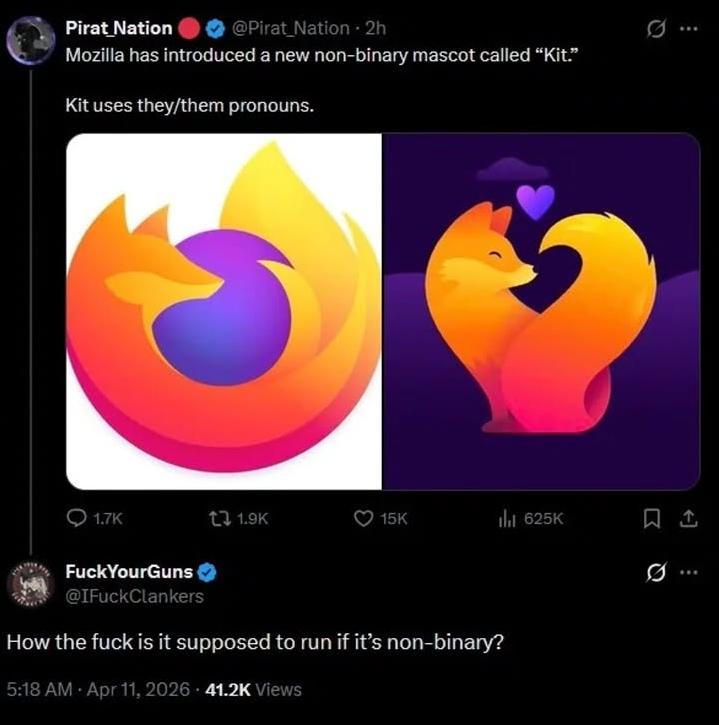
Mozilla announces their new non-binary mascot "Kit" who uses they/them pronouns, complete with adorable artwork of the Firefox logo looking all lovey-dovey at itself. Then someone drops the most brutally logical question: "How the fuck is it supposed to run if it's non-binary?" Because, you know, computers literally operate on binary. Ones and zeros. The entire foundation of computing. Every single process, every pixel, every mascot announcement tweet—all running on good old-fashioned binary code. The irony is absolutely chef's kiss. It's like announcing your vegan mascot is made of beef. The joke writes itself: a browser that processes millions of binary operations per second has a mascot that identifies as non-binary. The philosophical implications are giving my CPU an existential crisis.

How It's Supposed To Run

How It's Supposed To Run
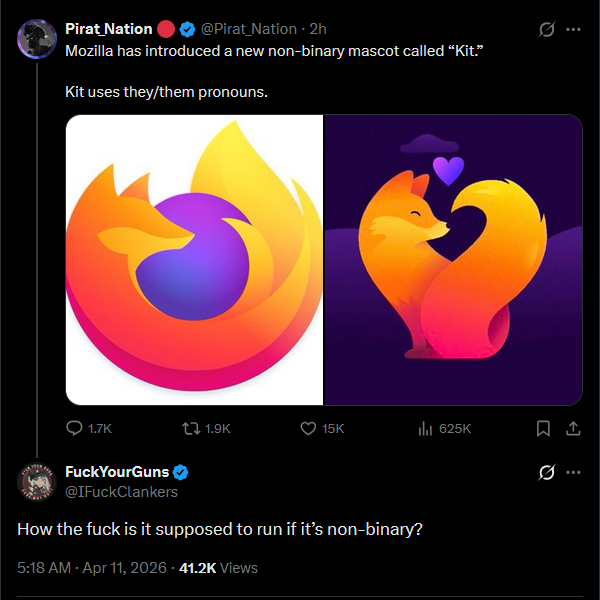
Someone at Mozilla thought it'd be progressive to give their mascot they/them pronouns, and this developer just asked the most valid technical question of 2026: if Kit is non-binary, how exactly does binary code execute? It's like trying to compile with a gender studies compiler flag that doesn't exist in the spec. Your CPU doesn't care about pronouns—it only speaks in 1s and 0s, and last I checked, there's no third state in boolean logic (sorry, quantum computing doesn't count yet). The Firefox logo went from "cool browser icon" to "anthropomorphized fox with feelings" real quick. Next update: Kit will probably demand we rewrite JavaScript in a more inclusive language. Maybe ternary operators instead of binary?

Those Little Dinosaurs, Noooo

Those Little Dinosaurs, Noooo
The Chrome offline dinosaur game exists because your internet went down. Turn on WiFi and suddenly you're committing mass extinction. Those little pixelated dinos had a good run jumping over cacti, but connectivity is their meteor. The WiFi icon as a flaming asteroid is *chef's kiss* accurate. RIP to all the dinosaurs we've murdered just by fixing our network connection.

Inside Every Browser There Are Three Goofy Dragons

Inside Every Browser There Are Three Goofy Dragons
The holy trinity of web development, depicted as three derpy dragons sharing one brain cell. HTML structures your content, CSS makes it pretty (or tries to), and JavaScript... well, JavaScript does whatever it wants and occasionally sets everything on fire. Together they form the three-headed beast that powers every webpage you've ever visited, looking absolutely ridiculous while doing it. The fact that they're drawn as goofy, tongue-out dragons instead of majestic creatures is probably the most accurate representation of frontend development ever created. Sure, they're powerful, but they're also chaotic, unpredictable, and somehow always causing problems when you least expect it.

Chrome Is Making Good Use Of My 5060

Chrome Is Making Good Use Of My 5060
You dropped $1,200+ on an RTX 5060 (or maybe 4060, who's counting) for some glorious 4K gaming and AI rendering, but instead Chrome's sitting there hogging 17GB of your precious VRAM just to display three tabs: Gmail, Twitter, and that recipe you opened two weeks ago. Meanwhile, your CPU's at 6% like "I could help but nobody asked me." The real kicker? FPS shows "N/A" because you're not even gaming—you're just browsing. But Chrome doesn't care. It sees your expensive GPU and thinks "finally, a worthy opponent for my 47 background processes." Your gaming rig has become a very expensive typewriter with RGB. Fun fact: Chrome uses GPU acceleration for rendering web pages, which is great for smooth scrolling and animations, but it treats your VRAM like an all-you-can-eat buffet. No restraint, no shame, just pure resource gluttony.

Vivaldi Bringing The Anti-AI Sass!

Vivaldi Bringing The Anti-AI Sass!
While Chrome, Edge, and Safari are tripping over themselves to shove AI chatbots into every corner of their UI, Vivaldi just dropped the coldest take in browser history: "Actually, human intelligence is better." 💀 The absolute audacity of releasing version 7.8 with the thesis that *checks notes* humans equipped with good tools don't need algorithmic assistants is chef's kiss levels of contrarian energy. It's like showing up to a Tesla convention in a perfectly maintained 1967 Mustang. Vivaldi basically looked at the billions being poured into AI integration and said "nah, we're good" – which is either the most refreshing stance in tech right now or a marketing strategy so galaxy-brained it loops back to being genius. Either way, respect for zigging while everyone else zags.

Catblock Activated!

Catblock Activated!
When you finally get tired of uBlock Origin's corporate branding and decide to go open source with a more... organic solution. The latency is terrible and it blocks legitimate content 90% of the time, but at least it purrs when you pet it. Side effects include random keyboard inputs, deleted production code, and an inexplicable increase in mouse-related 404 errors. Still better than disabling JavaScript entirely though.

Is There Even Any Safe Browser?

Is There Even Any Safe Browser?
When you work at Google and realize that cookie consent banners are just UX theater. The code literally says "if user accepts cookies, collect their data. else... also collect their data." It's the illusion of choice wrapped in GDPR compliance paperwork. The autocomplete suggestion "abc data" is the cherry on top—like the IDE is trying to help you remember all the different data collection endpoints you've built. "Was it abc data? Or xyz data? Oh wait, it's ALL the data." Spoiler alert: There is no safe browser. They're all just different flavors of data collection with varying levels of honesty about it. At least Google's upfront about monetizing your existence.

The Illusion Of Privacy

The Illusion Of Privacy
Chrome asking which website you'd like to see is like a stalker asking what you want for dinner—they already know, they're just being polite. User thinks incognito mode is some kind of witness protection program, but Chrome's just putting on a trench coat while still taking notes. Spoiler: Google knows. Google always knows. Incognito mode stops your roommate from seeing your search history, not the entire internet infrastructure from logging your every move. It's the digital equivalent of closing your eyes and thinking you're invisible.

T He Fu Tu Re Is Ai

T He Fu Tu Re Is Ai
You try so hard to dodge the AI hype train. You stick to your principles. You refuse to add "AI-powered" to every feature. You won't shoehorn ChatGPT into your perfectly functional app. You're building real software, not buzzword bingo. Then Firefox—yes, FIREFOX, the browser that's supposed to be the scrappy underdog fighting for an open web—comes flying in with a haymaker of AI features you never asked for. Sidebar chatbots, AI-generated alt text, the whole nine yards. Even the good guys have fallen. There's no escape. Every company from your local pizza shop to your IDE is cramming AI into places it doesn't belong. The future isn't AI. The future is being beaten into submission by AI whether you like it or not.

State Of PCMR

State Of PCMR
Chrome showing up to your system like a shady dealer in an alley. You boot up your machine with 8GB thinking you're good, and Chrome's already there with 47 tabs open, each one demanding its own gigabyte like some kind of memory protection racket. Meanwhile your actual applications are getting swapped to disk wondering what happened to their allocated resources. The PC Master Race subreddit knows the pain—you spent $2000 on a gaming rig just to watch Chrome consume more RAM than Cyberpunk 2077. At least the drug dealer asks politely.

Do British Websites Use Biscuits?

Do British Websites Use Biscuits?
Ah, the cultural confusion between American and British English strikes again! Someone's clearly been deep in web development and heard about "cookies" but then remembered the British call cookies "biscuits." So naturally, they had to Google if British websites use "biscuits" instead of "cookies" for storing user data. For the uninitiated: in web development, cookies are small text files that websites store on your device to remember information about you. They're called cookies everywhere, even in Britain where actual edible cookies are called biscuits. The browser doesn't change terminology based on your location settings. Imagine if they did though: "This site uses biscuits to enhance your experience, love. Fancy a cuppa while you accept?"