Console.log Memes

Posts tagged with Console.log

Console Logs Will Do Fine

Console Logs Will Do Fine
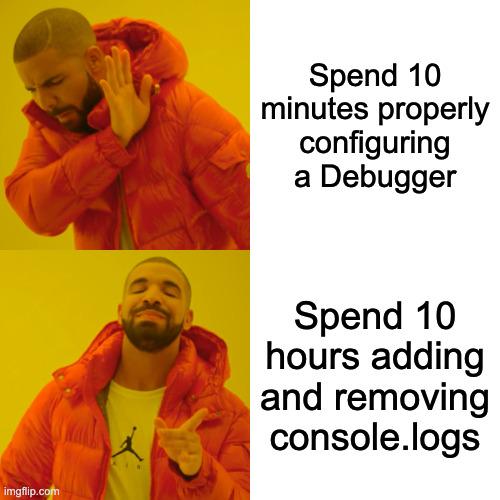
Look, we've all been there. The CTO sends down the mandate about "proper debugging practices" and "professional development workflows," but you know what? When your code breaks at 2 AM, you're not launching a full IDE debugger setup with breakpoints and watch expressions. You're slapping in a console.log("HERE") and calling it a day. Real debuggers are great in theory—until you need to configure source maps, set up remote debugging, or figure out why your breakpoint isn't hitting in that async callback hell. Meanwhile, good old console.log() has never let anyone down. It works in production, it works in dev, it works when everything else fails. The kid in the bottom panel represents every developer who's discovered that the simplest solution is usually the right one. Sure, you could spend 30 minutes setting up a debugger... or you could find the bug in 3 minutes with strategic console logging. Time is money, and console logs are free real estate.

This Can Not Be Denied

This Can Not Be Denied
Your IDE comes equipped with breakpoints, step-through debugging, variable watchers, call stack inspection, and literally EVERYTHING you could ever dream of to hunt down bugs like a professional detective. But do you use any of that? ABSOLUTELY NOT. Instead, you're out here smashing that console.log() button like it's the only debugging technique that exists in the known universe. "I got here" - truly the pinnacle of software engineering diagnostics. Why spend 30 seconds learning the debugger when you can spend 3 hours sprinkling console.logs throughout your entire codebase like cursed breadcrumbs? It's not lazy, it's *tradition*.

I'M In.

I'M In.
The hacker in every movie ever: *furiously types for 3 seconds* "I'm in." Meanwhile in reality: you console.log your way into the system and immediately get undefined back. The most anticlimactic hack of all time. No firewalls breached, no mainframes penetrated, just JavaScript being JavaScript and returning undefined because you forgot to actually return something from your function. Hollywood lied to us—real hacking is just debugging with extra steps.

Found On Facebook

Found On Facebook
Why learn breakpoints and step-through debugging when you can just scatter print statements like breadcrumbs through your code? The superior debugging technique: if the print statement fires, you know the code got that far. If it doesn't, well, time to add more print statements above it. Debuggers are for people who have their life together. The rest of us are out here with console.log("HERE") , print("wtf") , and the classic System.out.println("why is this not working") . Bonus points if you forget to remove them and they end up in production.

Adding Print Statements Everywhere vs Using Debugger

Adding Print Statements Everywhere vs Using Debugger
Every developer has that one friend who swears by proper debugging tools with breakpoints, step-through execution, and variable inspection. Meanwhile, the rest of us are out here spamming console.log() , print() , or System.out.println() like we're getting paid per line. Sure, debuggers are powerful and efficient. But there's something deeply satisfying about littering your codebase with print statements, watching the terminal scroll like the Matrix, and somehow figuring out exactly where things went wrong. Plus, you don't have to remember any keyboard shortcuts or set up IDE configurations. The red button gets smashed so hard it's practically embedded in the desk. Why learn a sophisticated tool when print("HERE") , print("HERE2") , and print("WTF") have never let us down?

The Sophisticated Art Of Debugging

The Sophisticated Art Of Debugging
Ah, the ancient debugging technique of sprinkling print() statements throughout your code like some deranged confetti cannon. Sure, actual debuggers exist with their fancy breakpoints, variable inspection, and step-through execution... but why use sophisticated tools when you can just scream into the void with random console outputs? Nothing says "professional developer" quite like 47 variations of print("HERE!!!") , print("WHY????") , and the classic print("AAAAAAHHHHH") . The debugger button sits there, judging you silently, while you choose chaos instead.

Timeout Sort: The Accidental Sorting Algorithm

Timeout Sort: The Accidental Sorting Algorithm
Behold the accidental genius of setTimeout sorting! The code loops through an array and logs each value using setTimeout with the value itself as the delay. Since JavaScript's event loop processes timeouts in order of expiration, smaller numbers appear first in the console. Congratulations! You've invented the world's most inefficient sorting algorithm with O(max(array)) time complexity. The array magically appears sorted in the console, not because of any actual sorting logic, but because the browser's event scheduler is doing all the work. Somewhere, a computer science professor just felt a disturbance in the force.

Who Needs Breakpoints Anyway?

Who Needs Breakpoints Anyway?
The ancient art of printf debugging – where you litter your code with print statements because proper debugging tools are apparently too mainstream. The axolotl is the perfect mascot here – an ancient creature that refuses to evolve, just like developers who still use printf instead of learning their IDE's debugger. The "Who needs breakpoints?" caption perfectly captures that stubborn senior dev energy of "I've been doing it this way for 20 years, why change now?" Meanwhile, "O RLY?" books were the Stack Overflow of the pre-Stack Overflow era. Just admit it – we've all reached for this technique when the proper debugger was being temperamental at 2AM.

If It Works, Don't Touch It

If It Works, Don't Touch It
The sacred commandments of debugging have been passed down through generations: never mess with working code, but absolutely terrorize broken code with console logs until it reveals all its secrets. That moment when your perfectly functional codebase starts acting up, and suddenly you're interrogating it like a detective in a noir film. "Tell me where you hid the bug. I can do this all day. Another console.log? Don't mind if I do." The irony is we'll spend hours adding and removing console logs instead of using proper debugging tools. It's not about efficiency—it's about sending a message to our code.

Console Log There There

Console Log There There
The dad joke energy is strong with this one. When JavaScript bugs get you down, don't cry—just console.log() your problems away! It's the developer equivalent of patting someone on the back while saying "there, there" but with more syntax. Meanwhile, those dinosaurs in the bottom panel are clearly the senior devs at the bar after work, drinking away the memory of that production bug nobody can fix. They've evolved beyond console logging—they've reached the "pour one out for the codebase" stage of debugging.

Madness Or Brilliance

Madness Or Brilliance
Every developer knows that proper debugging tools exist. And yet, there we are at 3 AM, littering our code with console.log() statements like breadcrumbs in a forest of bugs. Sure, it's primitive. Sure, your senior developer is judging you. But when that random string finally prints exactly where you expected it to, you feel like a goddamn genius. It's not elegant, but it gets the job done—just like duct tape on a space station.

If It Works, Don't Touch It

If It Works, Don't Touch It
The first rule of production code: never mess with something that's running smoothly. The second rule? Bombard your non-working code with console.log() statements until you've extracted a full confession from every variable. It's not debugging—it's an interrogation. The code will talk eventually. They always do.