windows Memes

Where Does This Scale On The Monitor Alignment Chart?

Where Does This Scale On The Monitor Alignment Chart?
Someone's Windows display settings got absolutely wrecked, and now they're being asked to identify which monitor is which in a lineup that looks like someone played Tetris with their screens while having a seizure. The monitors are numbered 1-12 in what appears to be the result of plugging in every display device you've ever owned simultaneously—probably after a driver update or unplugging the wrong HDMI cable. The best part? Monitor 11 is highlighted and positioned vertically like it's trying to escape this chaos. Someone's definitely running a setup that involves at least three different GPU outputs, two USB-C adapters that barely work, and one monitor that only turns on if you sacrifice a chicken to the display gods. The "Identify" button at the bottom is doing some heavy lifting here, because good luck figuring out which physical screen corresponds to number 7 without a PhD in spatial reasoning. Fun fact: Windows has supported up to 10 displays since Windows 7, but just because you *can* doesn't mean you *should*. This setup probably requires more cable management than a data center and draws enough power to dim the neighborhood lights.

I Mean...

I Mean...
The beautiful circle of life where every OS gets to complain about their own special brand of torture. Windows can't stop forcing updates at 3 AM when you're mid-presentation. Apple won't let you install that perfectly good app from 2019 because it's "not optimized" (translation: we want our 30% cut). Android ships with 47 pre-installed apps you'll never use but can't uninstall because they're "essential system components." And Linux? Well, Linux users are just vibing, having achieved enlightenment through pain and sudo commands. The bottom panel really seals the deal—everyone's accepted their fate and learned to smile through the suffering. Peak Stockholm syndrome energy right here.

I Hate That When It Happens

I Hate That When It Happens
You just want to call it a night and shut down your machine. Simple request, really. But Windows has other plans. Those two update options sitting there with their little warning icons, basically holding your sleep hostage until you let Microsoft install whatever they feel like pushing today. The "Sleep" option just chilling at the top, taunting you with its simplicity. But no—you've got to pick between "Update and shut down" or "Update and restart." Neither of which is what you asked for. It's like ordering water and being told you can have sparkling water or hot water. Just give me the normal option. Windows really said "so you wanna do it the hard way, huh?" because apparently wanting to just power off without a 45-minute update session is asking too much. Peak OS design right there.

Me In 2050

Me In 2050
The year is 2050. Tech companies have finally achieved their ultimate dream: forcing everyone to authenticate through their cloud services for literally everything. Want to access your own files on your own machine? Sorry buddy, Microsoft/Google/Apple needs to verify your identity first. The UN peacekeepers are here to "help" you migrate to the cloud, but you're having none of it. You've barricaded yourself in your home office, clutching your local user account like it's the last bastion of digital freedom. They can pry your offline credentials from your cold, dead hands. Future historians will call this the Great Local Account Resistance of 2050. Your grandchildren will ask "What was a local user account, grandpa?" and you'll shed a single tear while explaining the ancient times when you could actually own your own computer without needing internet permission to use it.

I Love It

I Love It
Windows will happily install software from the Reagan administration without batting an eye, maintaining backward compatibility like it's a sacred duty. Meanwhile, Linux is out here with that smug "already installed" energy because half your system came pre-packaged from 1999. The duality of operating systems: one hoards legacy support like a digital museum, the other ships with everything including the kitchen sink. Both approaches are equally chaotic in their own special way, and somehow we've all just accepted this as normal.

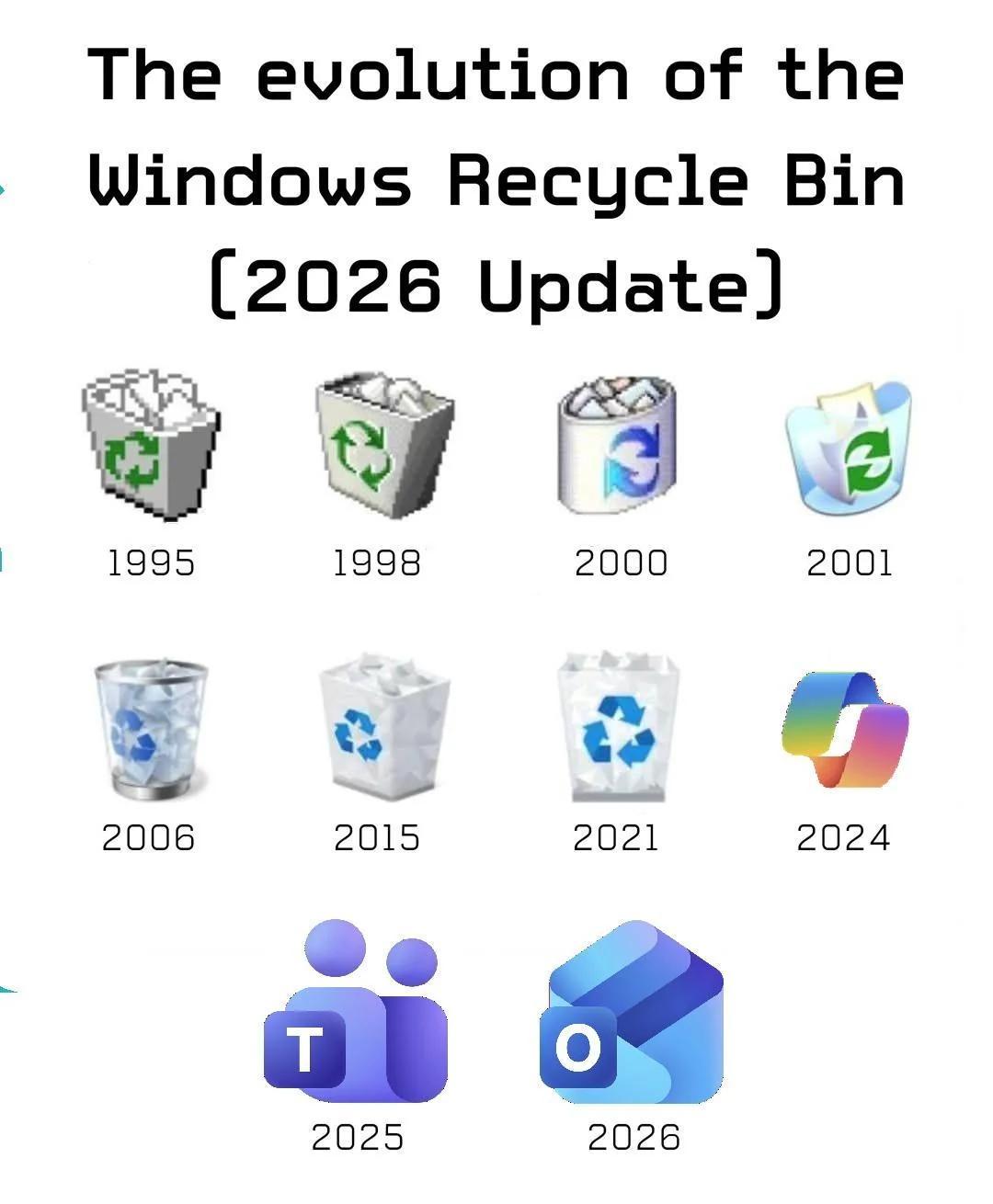
Evolution Of The Trash Icon

Evolution Of The Trash Icon
The recycle bin icon started as actual trash, then slowly evolved into something recognizable. But somewhere around 2000, Microsoft decided Internet Explorer deserved its own dedicated spot in the metaphor. Fast forward to 2025-2026, and we're predicting Microsoft Teams and whatever rainbow monstrosity they're cooking up next will become the new universal symbols for "things you want to delete." The trajectory is clear: Microsoft products aren't just software anymore—they're waste management infrastructure. Give it a few more years and the entire taskbar will just be one giant trash can with different flavors of regret.

This Has To Be The Best Blue Screen Of Death I've Ever Seen In Person

This Has To Be The Best Blue Screen Of Death I've Ever Seen In Person
Windows decided to get philosophical and just display ":(" followed by "You" on the BSOD. No cryptic error codes, no "CRITICAL_PROCESS_DIED", no "IRQL_NOT_LESS_OR_EQUAL"—just straight up telling you that you are the problem. The OS has achieved sentience and is now gaslighting its users. Honestly, it's the most honest error message Microsoft has ever produced. No beating around the bush with technical jargon—just a sad face and a finger pointed directly at you. At least now we know who Windows really blames for all those driver failures.

I Will Show You In A Sec...

I Will Show You In A Sec...
Your app freezes mid-demo and suddenly you're John Wick with Task Manager, ready to end some processes. Nothing says "professional software engineer" quite like force-killing your own application in front of your boss or client. The best part? You'll pretend it's a "known issue" you're "actively investigating" while frantically checking if you committed your latest changes.

Story Of My Life...

Story Of My Life...
Nothing quite captures the essence of corporate IT like being told you don't have permission to do something while literally being logged in as "Machine Administrator." It's like being the king but still needing to ask the queen for permission to use the bathroom in your own castle. Windows has this beautiful way of gaslighting you into questioning your own existence. You're the admin. The system says you're the admin. But somewhere deep in the registry, some Group Policy from 2003 is laughing at your futile attempts to change a simple setting. The real administrator was the permissions we denied along the way. Fun fact: This usually happens because of User Account Control (UAC) or domain policies overriding your local admin rights. The solution? Right-click, "Run as Administrator"... even though you're already an administrator. Makes perfect sense.

Love Living In A Timeline Where MS Paint Has A Login Screen. What Went Wrong With Microsoft?

Love Living In A Timeline Where MS Paint Has A Login Screen. What Went Wrong With Microsoft?
Remember when you could just... open Paint and draw? Those were simpler times. Now Microsoft wants you to sign in with your Microsoft account just to scribble some pixels on a canvas. It's like needing a passport to use a crayon. The SpongeBob "Caveman" meme format captures the sheer absurdity perfectly—primitive brain trying to comprehend why a 30-year-old bitmap editor that literally just pushes RGB values around needs cloud integration and user authentication. Next thing you know, they'll add AI-powered brush strokes and a subscription tier for the color picker. This is peak modern Microsoft: take something that worked fine since Windows 3.1, "modernize" it by shoving Azure AD authentication down its throat, and call it innovation. Paint used to be 2MB of pure simplicity. Now it probably phones home more than Windows Telemetry.

Awkward...But Chill

Awkward...But Chill
Windows asking you to buy a license and you just casually hitting "No" is basically the most passive-aggressive relationship in tech. And Windows? Windows just goes "Ok" like nothing happened. No guilt trip, no feature lockdown, no angry pop-ups every 5 minutes. Just... acceptance. It's been like this for decades. Microsoft knows you're not buying it, you know you're not buying it, but everyone plays along in this beautiful dance of plausible deniability. They'll throw a watermark on your desktop and call it a day. Meanwhile, other software will brick itself if you sneeze wrong during activation. Fun fact: This gentleness is probably why Windows has such massive market share. They let you "evaluate" indefinitely while Adobe out here requiring a blood oath and your firstborn's email address.

Hail Massgrave!

Hail Massgrave!
Oh, the sheer AUDACITY of opening PowerShell twice during a fresh Windows setup! Microsoft's surveillance system is apparently on high alert, watching you like a hawk because clearly you're about to do something absolutely SCANDALOUS with that command line. For context, Massgrave is a popular open-source Windows activation tool that runs via PowerShell scripts. So Microsoft sees you launching PowerShell for the second time and is like "Hold up, wait a minute, something ain't right here..." 👀 The paranoia is REAL. You could literally be checking your IP address or creating a directory, but nope—Microsoft's already writing your name down in their naughty list. Big Brother Bill is watching, and he's VERY concerned about your PowerShell habits.